
Amazon SES Review: Pricing, Setup and Limits (2026)
Amazon SES strips away SaaS markups to offer low-cost email infrastructure. This review covers the sandbox, DKIM and MAIL FROM setup, pricing and the bounce handling you have to build yourself.

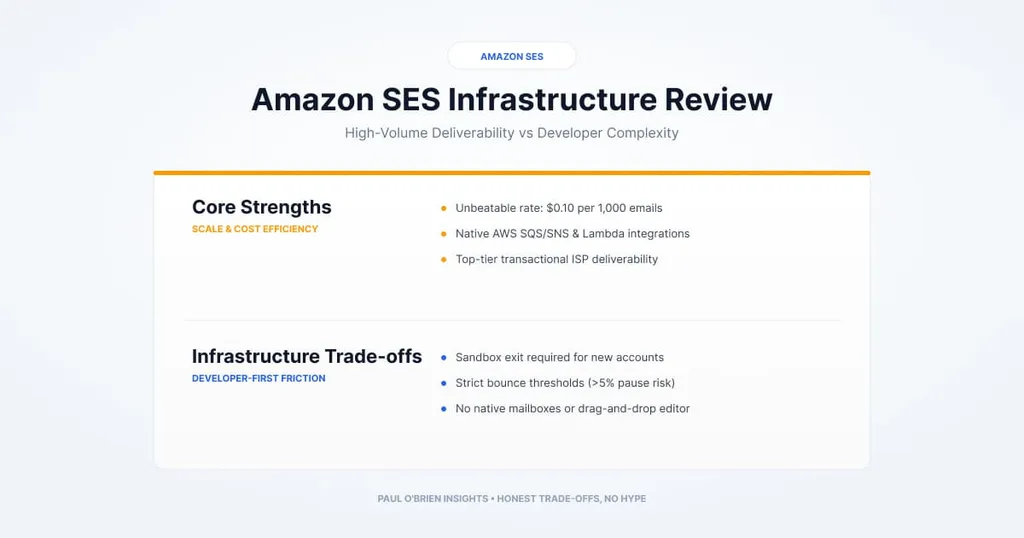
Amazon SES is raw email infrastructure: you pay about $0.10 per 1,000 emails, and in return you build the bounce handling, suppression lists and tooling yourself. It suits developers who want a low price floor at scale, and it suits you less if you want a dashboard, a template editor and someone to hold your hand.
Managed platforms such as Postmark, SendGrid and Mailgun charge a premium for deliverability dashboards, template builders and priority routing. Amazon Simple Email Service (SES) cuts out the middleman. It gives you the pipes, over SMTP and an API, for teams who would rather own their suppression lists, reputation monitoring and deployment workflows inside AWS.
I run my own email marketing platform built directly on top of SES, and it has been brilliant. Once you get past the initial setup, it sits quietly in the background without giving me any grief, handling bulk sends without rinsing my wallet.
Short answer: choose SES if you are comfortable with AWS, want the lowest price per email at volume and are happy to build the surrounding plumbing. Skip it if you need a human webmail interface, a drag-and-drop campaign editor or zero-configuration setup.
At a Glance: Who Amazon SES Is (and Isn’t) For
| User Profile | Best Fit? | Core Value Drivers / Key Trade-offs |
|---|---|---|
| Developer sending transactional email (resets, receipts) | Ideal | Cheap, reliable and scriptable. You handle bounces and monitoring. |
| Newsletter or marketing sender with a self-hosted front end | Ideal | Pair SES with Listmonk or Mailcoach for a fraction of SaaS prices. You maintain the stack. |
| Team already running on AWS | Strong fit | Inbound mail can feed S3, Lambda and SNS without leaving the cloud. |
| Non-technical business wanting to send newsletters | Alternative needed | No editor, list management or reporting out of the box. |
| Anyone needing a mailbox for people | Alternative needed | SES has no inbox UI. See Google Workspace or Outlook and Exchange. |
Amazon SES vs Managed Email Providers
| Dimension | Amazon SES | Managed providers (Postmark, SendGrid, Mailgun) |
|---|---|---|
| Market segment | Bare-metal cloud infrastructure | Managed developer-first email platforms |
| Baseline cost | About $0.10 per 1,000 emails | Generally higher per email and tiered by plan. Check each provider’s current pricing |
| Deliverability and IP risk | Self-managed with SNS, CloudWatch or Virtual Deliverability Manager | Turnkey, with managed warm-up and stream separation |
| Setup effort | Higher. Sandbox, DNS records and webhook handling | Lower. Test sending is quicker to start |
| Primary value | Lowest price floor at scale | Fast setup, visual builders and developer experience |
Where SES Shines
Because SES is a component rather than a finished product, you can plug it into most workflows:
- Email marketing and broadcasts. This is where I use it. Pair SES with a self-hosted front end such as Listmonk or Mailcoach and you get a working marketing suite for a fraction of the cost of Mailchimp or ConvertKit.
- Transactional application email. Password reset links, signup confirmations and invoice receipts triggered from your code.
- Inbound document and invoice processing. Ingesting attachments from incoming customer email into cloud storage to trigger extraction workflows.
- Automated replies. SES can receive customer messages and hand them to code, including an AI agent, that sends the reply. I covered a similar pattern on Cloudflare in my Agentic Inbox review.
The Features That Set SES Apart
- Virtual Deliverability Manager (VDM). Deliverability insights and recommendations inside the console, which can help you spot SPF or DKIM configuration mistakes early. It is an add-on with its own per-email charge.
- Receipt rules. Intercept incoming mail at the domain level and pipe it into other cloud resources without maintaining an inbox.
- Dedicated IP pools. High-volume senders can lease dedicated IP addresses and group them into pools. That keeps critical transactional mail isolated from marketing campaigns, so a deliverability problem in one does not hit password resets.
The Developer Experience: Setup Effort vs Raw Efficiency
It is worth addressing the elephant in the room: why do some developers hesitate with SES and head straight to Postmark or SendGrid? Put simply, SES doesn’t try to hold your hand. It gives you bare-metal infrastructure and leaves you to build the application around it.
- The sandbox. New accounts start in a sandbox, tracked separately for each AWS Region. According to AWS’s documentation, you can send to verified addresses and domains only, up to 200 messages per 24 hours and 1 message per second. Production access is a form asking for your mail type, website and an acknowledgement that you only email people who asked for it and handle bounces and complaints. AWS says the initial response usually comes within 24 hours.
- No built-in tools. There are no visual template builders, contact list management or campaign editors. If you want open or click tracking, you wire up event publishing yourself.
- Manual suppression pipelines. SES will not clean your lists for you. You build a pipeline, typically with SNS and Lambda, to catch bounce and complaint events and suppress bad addresses in your own database.
It takes a bit of work to set up initially, but once that pipeline is running you get a hugely capable email system for next to nothing.
How SES Works: Outbound and Inbound
SES operates in two modes, which makes it fundamentally different from IMAP or POP3 mailbox hosts.
- Outbound (API or SMTP relay). You send using SMTP credentials or the AWS SDK, such as
SendEmailorSendRawEmail. SES handles DKIM signing and delivery tracking. - Inbound (receipt rules). When mail arrives at an SES-monitored domain it isn’t saved to a mailbox. A receipt rule triggers actions instead: store the raw message in S3, run a Lambda function on it, or publish a notification to SNS or EventBridge.
Authentication: DKIM, SPF and Custom MAIL FROM
If you want mail in the inbox rather than the spam folder, authentication is non-negotiable. Because SES is raw infrastructure, you generate tokens in the console and publish them in your DNS. For background on what each check proves, see my guide to SPF, DKIM and DMARC.
| Mechanism | What you publish | What it does |
|---|---|---|
| DKIM (Easy DKIM) | Three CNAME records, built from the tokens SES gives you for your identity | SES signs every outgoing message so receivers can check it was not altered in transit |
| Custom MAIL FROM | An MX record and an SPF TXT record on a MAIL FROM subdomain, such as mail.yourdomain.com | Makes the envelope address use your domain instead of an amazonses.com one, so SPF can align for DMARC |
Two details from AWS’s MAIL FROM documentation are worth knowing. The records go on the MAIL FROM subdomain, not your main domain, and look like this, with your region substituted:
mail.yourdomain.com  MX   10 feedback-smtp.region.amazonses.com
mail.yourdomain.com  TXT  "v=spf1 include:amazonses.com ~all"
The subdomain must not be one you send from or receive mail on, and it must have exactly one MX record. If you don’t set a custom MAIL FROM, SES uses an amazonses.com subdomain. SPF then passes, but for the SES domain rather than yours, so it won’t align with your From address. DMARC can still pass through DKIM, but setting a custom MAIL FROM gives you both. You can also choose whether SES falls back to the default domain or rejects messages if the MX record stops working.
Publishing these records in Route 53 or Cloudflare takes about ten minutes, and it makes a real difference to your sender reputation.
How SES Fits Into Serverless Stacks
Scenario A: an AI agentic inbox pipeline
By chaining SES with AWS building blocks you can build an automated email worker:
- An email arrives at
agent@yourdomain.comand SES receives it. - SES stores the raw message in S3.
- S3 triggers a Lambda function that parses the message into clean text and attachments.
- Lambda sends the parsed body to a large language model, such as Amazon Bedrock or Anthropic Claude, to draft a reply or extract structured data.
- Lambda sends the reply back out through the SES API.
Inbound email (agent@yourdomain.com)
  Amazon SES (receives)
    Amazon S3 (stores raw message)
      AWS Lambda (parses and calls the LLM)
        Amazon SES API (sends the reply)
Scenario B: replacing Cloudflare Email Routing for AWS workloads
If your infrastructure already lives in AWS, using SES for inbound mail avoids cross-cloud hops, and you can process attachments with S3 triggers without the tighter memory limits of Cloudflare Workers. If you are weighing the alternative, see Mailflare and SaaSMail.
Amazon SES Pricing
SES is pay as you go, with no base monthly subscription. I could not load AWS’s own pricing page when updating this review, so the figures below come from my earlier version and a third-party tracker that cites AWS. Please confirm them on the AWS pricing page before you rely on them. Prices are listed in US dollars and may differ by region.
| Item | Price | Notes |
|---|---|---|
| Outbound email | $0.10 per 1,000 ($0.0001 each) | Standard shared infrastructure |
| Virtual Deliverability Manager | About $0.07 per 1,000 | Optional add-on for deliverability insights |
| Dedicated IPs | $24.95 a month per IP (standard), or from $15 a month (managed) | Optional. Worth it only at high, steady volume |
| Outgoing attachment data | About $0.12 per GB | A small monthly allowance may be included |
| Inbound email | Per incoming email and per 256 KB chunk | Sources give different rates. Check AWS |
| Free tier | Credits for newer accounts | A third-party tracker reports $200 of AWS credits for 6 months for accounts created after July 2025 |
Know the limits: AWS console sign-ups and pricing calculators often steer you towards bundled plans or add-ons such as VDM. If you stick to plain API or SMTP sending without managed add-ons, your base rate remains the outbound rate above.
Key Hurdles and Gotchas
- Bounce and complaint rates. According to AWS’s reputation documentation, your account is placed under review at a 5% bounce rate or a 0.1% complaint rate, and sending may be paused at 10% bounces or 0.5% complaints if the problem isn’t fixed by the end of the review period. That means handling bounce events is mandatory in production, not optional.
- No webmail UI. SES is purely infrastructure. There is no inbox, draft editor or campaign builder. You pair it with a client application, an open-source tool such as EmailEngine or Listmonk, or your own front end.
- Region-specific sandbox. Production access is requested per Region, so remember it if you move workloads.
My experience: don’t let the initial restrictions put you off. AWS scales your limits as your sending reputation grows. Over a few months of clean sending, I steadily increased my quota to 350,000 emails per 24-hour period with a burst rate of 100 emails per second, which is more than enough for massive broadcast campaigns. Your own limits will depend on your account and sending history.
Pros and Cons
| Strengths | Weaknesses |
|---|---|
| Very low cost per email at volume | Sandbox and production-access process |
| Reliable, scalable infrastructure inside AWS | You build bounce and suppression handling yourself |
| Flexible inbound processing with S3, Lambda and SNS | No templates, contact lists or campaign tools |
| Dedicated IP pools separate transactional from marketing mail | Sending can be paused if bounce or complaint rates climb |
| Easy DKIM and Custom MAIL FROM support strong authentication | Console and pricing options can be confusing |
Frequently Asked Questions
How much does Amazon SES cost?
Outbound email is about $0.10 per 1,000 messages on standard infrastructure, with optional add-ons such as dedicated IPs and Virtual Deliverability Manager. Confirm current rates on the AWS pricing page.
What is the Amazon SES sandbox?
A restricted mode for new accounts, tracked per Region. You can only send to verified addresses, up to 200 messages per day and 1 per second, until AWS approves a production access request.
How do I get out of the SES sandbox?
Submit a production access request in the console, saying whether your mail is marketing or transactional, giving your website and confirming that you only email people who asked for it and that you handle bounces and complaints. Verifying your domain first is recommended.
Is Amazon SES good for email marketing?
Yes, if you add a front end. SES has no campaign tools of its own, so you pair it with software such as Listmonk or Mailcoach, or build your own, as I have.
Do I need a custom MAIL FROM domain?
Not to send, but it is worth setting up. It lets SPF align with your domain, which helps with DMARC alignment alongside DKIM.
Can SES receive email?
Yes, through receipt rules that store messages in S3, run Lambda functions or publish to SNS. It does not give you a mailbox.
The Bottom Line
Best for: developers building programmatic email, high-volume transactional notifications, automated agent pipelines, self-hosted marketing platforms and low-cost serverless backends.
Skip if: you need a human webmail interface, a visual campaign editor out of the box, or zero-configuration domain setup.
Note: this article contains no affiliate links. Sources: AWS: SES sandbox and production access; AWS: SES reputation metrics; AWS: custom MAIL FROM domain; AWS: Easy DKIM; SaaS Price Pulse: SES pricing (third-party). Checked 9 October 2026.