
Microsoft Outlook and Exchange Review: Strengths, Limits
A technical look at paid Outlook and Exchange Online: which security features need which plan, how it compares to Google Workspace and Fastmail, and who should pick each.

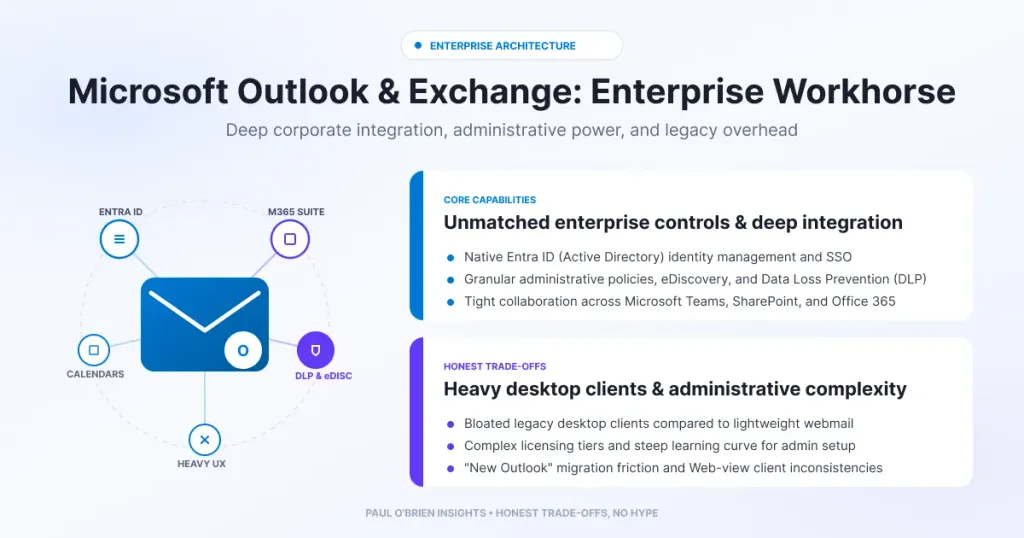
Microsoft Outlook with Exchange Online is the industrial foundation of business email. Its security stack, compliance tools and desktop client are hard to beat, but paid Outlook is heavy, the licensing is fiddly, and it sits in a large telemetry-driven ecosystem. Here is an honest, technical look at where it wins and where Fastmail and Google Workspace do better.
Having recently taken a deep dive into Fastmail and reflected on how we interact with email as a craft, I wanted to turn my attention to the indisputable corporate heavyweights: Microsoft Outlook and Exchange Online. If Google Workspace is the modern cloud native and Fastmail is the benchmark for independent privacy, Microsoft 365 is the industrial foundation of global enterprise. Millions of businesses run on Exchange Online without giving it a second thought.
Short answer: choose paid Outlook and Exchange Online if you need corporate compliance, strong admin controls and the classic Office desktop stack. Choose Google Workspace for browser-first collaboration. Choose Fastmail if you want speed, independence and privacy. Check which Microsoft plan you are buying, because some of the security features below are only in the top business tier.
At a Glance: Who Outlook and Exchange Is (and Isn’t) For
| User Profile | Best Fit? | Core Value Drivers / Key Trade-offs |
|---|---|---|
| Business already on Office, Teams and OneDrive | Ideal | Tight desktop integration, central admin and compliance. Licensing takes care to get right. |
| Regulated organisation needing archiving, DLP and eDiscovery | Strong fit | Purview and Defender tooling, with features depending on the licence tier. |
| Browser-first team | Partial fit | Outlook on the web works, but Google Workspace is built for the browser. |
| Privacy-minded individual or small team | Alternative needed | No inbox ads on paid plans, but you are inside a large data and AI ecosystem. |
1. The Exchange Engine Room and Security Stack
The free @outlook.com webmail is fine for everyday personal use, but upgrading to a paid Microsoft 365 subscription changes the underlying infrastructure completely. Your inbox is backed directly by Exchange Online, giving you access to commercial-grade mail transfer agent (MTA) routing.
Deliverability
Microsoft routes enormous volumes of legitimate corporate traffic, so its sending IP reputation is strong. When your custom domain (@yourcompany.com) has SPF, DKIM and DMARC correctly configured, your mail lands reliably in business inboxes. Reputation does not replace configuration, so read my guide to SPF, DKIM and DMARC before you move a domain.
Defender for Office 365: check your plan
Defender for Office 365 gives you detonation sandboxing for attachments in isolated environments and Safe Links, which inspects a link at the moment you click it and so helps against delayed phishing redirects. On the business plans these are not equal:
| Business plan | Mailbox | Defender for Office 365 |
|---|---|---|
| Business Basic | 100 GB primary, 50 GB archive | URL time-of-click protection only |
| Business Standard | 100 GB primary, 50 GB archive | URL time-of-click protection only |
| Business Premium | 100 GB primary, 1.5 TB archive | Plan 1 included, plus Purview data loss prevention for email and files |
These details are from Microsoft’s UK business plans page, checked 9 October 2026. Mailbox sizes were 50 GB until Microsoft added 50 GB in 2026, so older write-ups may differ.
Know the limits: the sandboxing and Safe Links described here belong to Defender for Office 365 Plan 1, which Microsoft lists in Business Premium but not Basic or Standard. Prices also differ by region, billing term and Copilot or Teams bundle, so check Microsoft’s own page. The UK page I checked listed Business Basic at £5.40 per user a month excluding VAT on an annual plan, with the other tiers priced much higher where Copilot is bundled.
Rights management and compliance
Microsoft offers message-level encryption and rights-management options, which can restrict what a recipient does with a message. It also offers Purview tooling for retention, litigation hold and eDiscovery. Which of these you get depends on your licence, so confirm the specific feature against your plan before you rely on it. For regulated organisations this compliance tooling is a real strength that few competitors match.
2. Desktop Mastery vs Google Workspace’s Cloud Focus
Where paid Outlook truly stands apart from Google Workspace is in its approach to desktop productivity. Google Workspace was built from day one for the browser. While Workspace Gmail excels at web-based collaboration, seamlessly linking Docs, Drive and Google Meet in a single tab, it can feel lightweight for power users managing dense, multi-account workflows offline.
Outlook, by contrast, still owns the desktop client standard. For professionals who manage massive local archives, complex folder structures, nested calendars and multiple shared mailboxes, the native Outlook desktop app remains an operational powerhouse. The tight loop between Outlook, Excel, Word, Teams and OneDrive creates a deeply integrated desktop workspace that millions of businesses rely on daily.
3. Speed, Privacy and Bloat: Where Fastmail Wins
While Microsoft Outlook dominates corporate governance and Google Workspace leads cloud collaboration, both carry significant baggage when compared to a specialised, independent provider like Fastmail.
- Speed and interface efficiency. The Outlook desktop app and web client carry decades of legacy code, complex transport rules and background add-ins, so searching large mailboxes can feel sluggish. Fastmail is built on open standards (IMAP, JMAP) and runs on its own bare-metal hardware, which is why its search and web interface feel quick.
- Privacy and telemetry. Paid Microsoft 365 accounts remove inbox ads, but you are still inside a massive corporate ecosystem driven by telemetry, data collection and aggressive AI expansion such as Copilot. Fastmail runs a subscription-only model with no ad incentive. My view on AI in the inbox is in How to turn off AI in email: Gmail, Outlook and Apple Mail.
- Data residency. Fastmail lets any customer choose US or EU data residency. With EU selected, the primary copy sits on Fastmail-owned servers in Amsterdam with a live replica in the US, and backups, logs and debug systems remain in the US. Fastmail also proxies remote images anonymously by default to block tracking beacons, and offers Masked Email through its 1Password integration.
Comparison: Outlook and Exchange vs the Alternatives
| Feature | Outlook and Exchange | Google Workspace | Fastmail |
|---|---|---|---|
| Best for | Corporate compliance and the Office desktop stack | Browser-first collaboration | Fast, private, independent email |
| Strength | Admin controls, Purview and Defender tooling | Docs, Drive and Meet in the browser | Speed, open standards, no ad model |
| Weakness | Legacy weight, licensing complexity, telemetry | Lighter for offline power users | Fewer enterprise compliance features |
| Data residency | Tenant-based, check your agreement | Check your agreement | US or EU, chosen by you |
| Full review | You are here | Google Workspace review | Fastmail review |
Pros and Cons
| Strengths | Weaknesses |
|---|---|
| Exchange Online backing and strong sender reputation | Heavy interface with decades of legacy code |
| Defender and Purview tooling on higher tiers | Best security features sit in Business Premium |
| Deep integration with Word, Excel, Teams and OneDrive | Licensing is complex and prices vary |
| No inbox ads on paid plans | Telemetry and Copilot push in a large ecosystem |
Frequently Asked Questions
Is Outlook the same as Exchange?
No. Outlook is the email client. Exchange Online is the mail server behind a paid Microsoft 365 mailbox.
Does every Microsoft 365 business plan include Safe Links and sandboxing?
No. Microsoft’s UK page lists Defender for Office 365 Plan 1 in Business Premium, and only URL time-of-click protection in Basic and Standard.
How big is an Exchange Online mailbox on Microsoft 365 Business?
Microsoft’s page lists 100 GB of primary mailbox on Basic, Standard and Premium, with a 50 GB archive on Basic and Standard and 1.5 TB on Premium.
Is Outlook better than Gmail for business?
It depends on your tools. Outlook suits desktop-heavy Office teams, while Gmail suits browser-first teams. See my comparison of why businesses choose Microsoft 365.
Is Microsoft 365 private?
Paid accounts have no inbox ads, but you are inside a large ecosystem with telemetry and AI features. If privacy is your top priority, compare it with Fastmail or an independent provider.
The Verdict
When choosing an email provider, the right choice depends on what you value most in your daily workflow:
- Choose paid Outlook if you need industrial-grade corporate compliance, heavy-duty Exchange security controls and deep integration with the classic desktop Microsoft Office stack.
- Choose Google Workspace if your team operates entirely in the browser and thrives on real-time cloud document collaboration and seamless web apps.
- Choose Fastmail if you view email as a distinct craft and you prioritise performance, independent ownership, no AI bloat and a commitment to privacy.
Note: this article contains no affiliate links. Sources: Microsoft 365 Business plans and pricing (UK); Fastmail: choosing your data residency. Checked 9 October 2026.

