
SPF Explained: What It Proves and Why It Fails
SPF lists which servers may send email for your domain, but it checks the delivery path, not the sender people see. This guide covers record syntax, ~all vs -all, the 10-lookup limit and why legitimate mail fails.

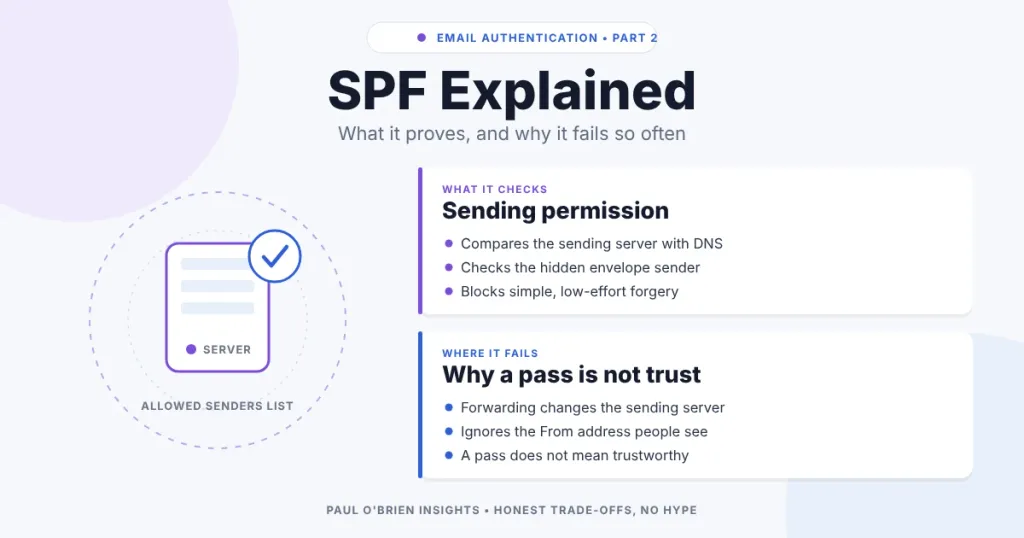
SPF is a DNS record that lists which servers are allowed to send email for a domain. A receiving server checks the connecting IP address against that list and records a result: pass, fail, softfail or neutral. It is useful and almost every domain should have one, but it checks the delivery path, not the sender the reader sees, and that gap explains most of the confusion around it.
If you arrived here because of a bounce, a “spf=fail” header or a warning about “~all” against “-all”, this guide covers what SPF proves, what it ignores, how to write a record that works and why legitimate email so often fails it. Standards and provider instructions were checked against RFC 7208 and the providers’ own pages on 8 October 2026.
Short answer: publish exactly one SPF record per domain, list every service that sends as you, keep it under 10 DNS lookups, and end it with ~all or -all. Then add DKIM and DMARC, because SPF alone does not protect the From address people see.
This is part of a series on email authentication. Start with how SPF, DKIM and DMARC work together, then read the individual guides to DKIM and DMARC.
At a Glance: Who Needs to Care About SPF
| User Profile | Best Fit? | Core Value Drivers / Key Trade-offs |
|---|---|---|
| Business with its own domain and several sending services | Ideal | Stops casual abuse and misconfigured senders. The 10-lookup limit becomes a real constraint as services pile up. |
| Individual with a custom domain on a mailbox provider | Strong fit | One include line from your provider is usually all you need. Easy to break by adding a second record. |
| Sender of bulk mail to Gmail, Yahoo or Outlook.com | Required | Gmail and Yahoo require SPF and DKIM for bulk senders. SPF alone does not satisfy the rules. |
| Owner of a domain that sends no email | Strong fit | A one-line record that authorises nothing, plus a DMARC policy, makes the domain a poor target for spoofing. |
| Someone using a free Gmail or Outlook address | Not applicable | The provider publishes SPF for its own domain. |
What SPF Actually Checks, and What It Ignores
SPF is evaluated during delivery. The receiving server takes the IP address of the server connecting to it, looks up the SPF record in DNS for the domain in the envelope sender (the Return-Path, also called MAIL FROM or the bounce address) and compares the two. RFC 7208 also checks the HELO name the sending server announces, and recommends checking it first.
It does not read the message. It ignores the subject, the body and the visible From address. That is the central point: a message can carry a From address of billing@yourbank.com while the envelope sender is a completely different domain that passes SPF without trouble. SPF has answered a question about the server, not about the person.
This is why DMARC exists. DMARC adds the missing check, that the domain which passed SPF (or DKIM) matches the From domain. Without that alignment step, an SPF pass proves very little about who the message appears to come from.
Anatomy of an SPF Record
An SPF record is a single DNS TXT record on your domain, beginning with v=spf1. This is an annotated example using reserved documentation addresses:
| Part | Meaning |
|---|---|
v=spf1 | Identifies the record as SPF version 1. It must come first. |
ip4:203.0.113.10 | Allows this one IPv4 address. Ranges use CIDR notation, such as ip4:203.0.113.0/24. ip6: works the same way. |
include:_spf.example.net | Also accepts whatever the SPF record at that domain accepts. This is how mailbox providers and bulk senders are added. |
mx | Allows the servers named in your domain’s MX records. |
~all | Matches everything else and says how to treat it. Always last. |
Put together, the published record reads: v=spf1 ip4:203.0.113.10 include:_spf.example.net ~all
Mechanisms
| Mechanism | What it does | Counts towards the 10 lookups? |
|---|---|---|
ip4, ip6 | Matches a fixed address or range | No |
all | Matches everything, used as the final catch-all | No |
include | Evaluates another domain’s SPF record | Yes, plus whatever that record then needs |
a | Matches the IP addresses of the domain’s A or AAAA records | Yes |
mx | Matches the addresses of the domain’s mail servers | Yes |
exists | Passes if a DNS name resolves, used in advanced setups | Yes |
redirect | Hands evaluation to another domain’s record | Yes |
ptr | Reverse-DNS matching | Yes. RFC 7208 marks it “do not use”. |
Qualifiers
Each mechanism can carry a prefix that decides what happens on a match. With no prefix, + (pass) is assumed.
| Qualifier | Result | Plain meaning |
|---|---|---|
+ | Pass | This server is authorised. |
- | Fail | This server is not authorised. Reject or treat with suspicion. |
~ | Softfail | Probably not authorised, but accept and mark. |
? | Neutral | No statement either way. RFC 7208 says to treat it like no record at all. |
A receiver can also return none (no SPF record found), temperror (a temporary DNS problem) or permerror (the record cannot be interpreted, for example because there are two records or too many lookups).
~all or -all: Which Should You Use?
This is the question behind many searches, and the providers do not agree with each other. As of 8 October 2026:
| Provider | What its documentation publishes or recommends |
|---|---|
| Google Workspace | v=spf1 include:_spf.google.com ~all, and says Google recommends ~all. |
| Microsoft 365 | v=spf1 include:spf.protection.outlook.com -all, recommending -all because DKIM and DMARC should be in place too. |
| Fastmail | v=spf1 include:spf.messagingengine.com ?all |
The practical difference is smaller than the debate suggests. Most receivers do not bin mail on an SPF result alone; they weigh it with DKIM, DMARC and their own reputation data. Where it does matter is DMARC. Microsoft explains that with ~all a DMARC policy can effectively treat SPF softfails as unenforced for unsigned mail, so -all gives DMARC something firmer to act on.
A sensible rule: use ~all while you are still discovering senders, because a missed service then lands in spam rather than bouncing. Once DMARC reports show everything legitimate is covered, move to -all if your provider recommends it. Do not use +all, which authorises the entire internet, and note that ?all offers no protection.
Know the limits: forwarded mail can fail a strict -all through no fault of yours (see below). That is another reason DKIM matters, because a DKIM signature survives forwarding when SPF does not.
The 10 DNS Lookup Limit
RFC 7208 limits an SPF evaluation to 10 DNS lookups. The terms that count are include, a, mx, ptr, exists and redirect, including those inside included records. ip4, ip6 and all do not count. Go over and the result is permerror, which receivers usually treat as an SPF failure.
The limit is easy to hit because each service you add brings its own includes, and those can include others. Microsoft’s own guidance repeats the warning that more than 10 lookups causes a permanent error. The RFC also says to limit “void” lookups, ones that return nothing or a non-existent domain, to two.
Staying under the limit
- Remove services you no longer use. Old newsletter tools and abandoned CRMs are the usual culprits.
- Prefer
ip4andip6where a service gives you fixed addresses. - Use subdomains. Send marketing mail from
news.example.comwith its own SPF record, so the lookups are not shared with your main domain. - Be careful with flattening. Replacing includes with raw IP lists saves lookups, but providers change their addresses. A flattened record that is not refreshed automatically will quietly go stale and start failing real mail.
- Avoid
ptr. It is slow, unreliable and discouraged by the standard.
RFC 7208 also advises keeping a published record within 512 octets, so that the DNS answer fits comfortably in a single response. Long lists of IP addresses can run into that before the lookup limit.
One Record Only
A domain must have no more than one SPF record. If you publish two TXT records that both start v=spf1, receivers return permerror and SPF fails for every message. Microsoft states that only one SPF record is allowed per domain or subdomain, and lists multiple records as a cause of permerror.
This usually happens when you add a second service and paste its suggested record alongside the first. The correct fix is to merge them into one record:
| Wrong (two records) | Right (one merged record) |
|---|---|
v=spf1 include:_spf.google.com ~allv=spf1 include:_spf.example.net ~all | v=spf1 include:_spf.google.com include:_spf.example.net ~all |
Each subdomain that sends mail needs its own record too. Google’s guidance makes the same point that each domain must have its own SPF record.
Why Legitimate Email So Often Fails SPF
SPF assumes the server delivering the message is the one the domain owner listed. Several ordinary situations break that assumption.
| Cause | What goes wrong | Fix |
|---|---|---|
| Forwarding | The forwarding server’s IP is not in the original domain’s record, so SPF fails at the final destination. | Rely on DKIM, which survives forwarding. Forwarders can use Sender Rewriting Scheme (SRS) to change the envelope sender. |
| Mailing lists | The list server resends your message from its own address, often rewriting the envelope sender. | DKIM plus DMARC settings that suit the list. ARC helps some receivers trust forwarded mail. |
| A service missing from the record | Invoicing, newsletter or helpdesk tools send as your domain but are not listed. | Add the service’s include or IPs, then recheck the lookup count. |
| Two SPF records | Permerror for every message. | Merge into one record. |
| More than 10 lookups | Permerror, often only for some senders. | Remove unused services, use subdomains or carefully flatten. |
| Typo or wrong syntax | Permerror, or a mechanism silently not matching. | Check spacing, include: spelling and a final all. |
| Service uses its own bounce domain | SPF passes for the provider’s domain, not yours, so DMARC alignment fails. | Set up a custom return-path or enable DKIM signing with your domain. |
Envelope rewriting such as SRS helps forwarded mail pass SPF, but it adds complexity and does not solve the identity problem. DKIM, DMARC and ARC are the complementary tools, which is why the next guides in this series exist.
Why an SPF Pass Does Not Make a Message Trustworthy
An SPF pass means the delivering server was allowed to send for the domain in the envelope sender. Anyone can register a domain, publish a valid SPF record and send mail that passes. Spammers and phishers do exactly this. A pass says nothing about intent, honesty or whether the visible From address is genuine.
That is also why checking SPF alone is a weak defence for users. The useful question is whether the passing domain matches the From address, and that is DMARC’s job.
How to Check Your SPF Record
- Look up the record. From a terminal, run
dig +short TXT yourdomain.comand find the line beginningv=spf1. There should be exactly one. - Count the lookups. Add up every
include,a,mx,existsandredirect, then the lookups inside each include. Free online SPF checkers do this for you. - Send a test message to a Gmail account, open Show original and look for
spf=passand the domain it passed for. - Read your DMARC reports. They show which sources send as your domain and whether SPF passed and aligned, which is the best way to find forgotten senders.
Where SPF Fits, and Where It Stops
SPF dates from the early 2000s, when the aim was modest: let a domain say which machines may send its mail. It does that job well, and blocks low-effort abuse and misconfigured sending. It was not designed to establish identity, and email infrastructure has grown far more complex around it.
Gmail and Yahoo now expect bulk senders to have SPF and DKIM and a DMARC policy, so SPF is a requirement rather than an option. Treat it as the foundation, not the finish.
Frequently Asked Questions
What does SPF stand for?
Sender Policy Framework. It is defined in RFC 7208, which lets a domain publish the servers allowed to send its email.
What is the difference between ~all and -all?
~all is a softfail: mail from unlisted servers is probably unauthorised but is normally accepted and marked. -all is a hard fail: such mail is unauthorised. Google recommends ~all for Workspace and Microsoft recommends -all for Microsoft 365, so follow your provider and move to -all once DMARC reports show you have covered every sender.
Why does my SPF pass but DMARC still fail?
Because DMARC needs the domain that passed SPF to match the From domain. If a third-party service uses its own bounce domain, SPF passes for that domain and not yours. Fix it with a custom return-path or by signing with DKIM using your domain.
Can I have more than one SPF record?
No. Publish one record per domain and merge all your services into it. Two records cause a permerror.
What happens if I exceed 10 DNS lookups?
The check returns permerror and receivers will usually treat the message as failing SPF. Remove unused services, use subdomains for separate senders or flatten carefully.
Does SPF stop spoofing of the From address?
Not by itself. SPF checks the envelope sender, not the From header. Pair it with DKIM and a DMARC policy to protect the address people see.
Do I need SPF on a domain that sends no email?
Yes, it is worth publishing v=spf1 -all, which says no server may send for the domain. Combine it with a DMARC p=reject policy to make the domain a poor target for spoofing.
The Bottom Line
SPF answers a narrow question, which servers may send for this domain, and answers it reliably when the record is tidy. Keep one record, stay under 10 lookups, list only the services you really use and pick ~all or -all on purpose. Then let DKIM and DMARC do what SPF cannot.
Sources: RFC 7208; Microsoft Learn: set up SPF; Google Workspace: set up SPF; Fastmail: domain set-up. No affiliate links in this article.

