
saasmail Review: Self-Hosted Customer Inbox on Cloudflare
saasmail is an open-source, self-hosted customer inbox that runs on Cloudflare Workers for about $5 a month, with one timeline per customer. This review covers the setup gotchas, passkey login, costs and who it suits.

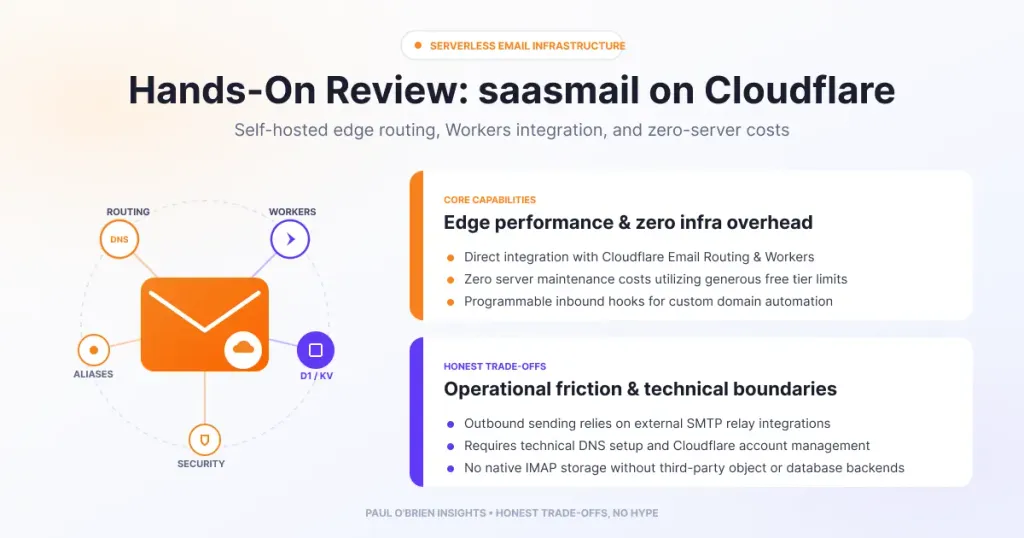
saasmail is an open-source, self-hosted customer inbox that runs on Cloudflare Workers for roughly $5 a month. It puts every email from a customer, whether support, billing or marketing, onto one timeline. In my testing it was polished and reliable once running, but the manual setup was longer than I expected and it has no one-click deploy.
When saasmail popped up on my X feed, I decided to give it a test run. I don’t personally need it right now, but with a bit of time to spare it looked like a good candidate for a technical review, especially as a lightweight, open-source alternative to heavy support ticketing tools such as Zendesk.
If you run a SaaS product or online business, customer communication usually ends up scattered across three or four tools: marketing email in one service, transactional password resets in a background worker and support tickets in a help desk. saasmail aims to replace that sprawl with a single timeline per customer.
Short answer: a remarkably polished piece of software for small SaaS teams and solo founders who already use Cloudflare and want ownership of their customer email for about $5 a month. Expect a 30 to 40 minute setup, and don’t treat it as proven under heavy load, because I haven’t tested that.
At a Glance: Who saasmail Is (and Isn’t) For
| User Profile | Best Fit? | Core Value Drivers / Key Trade-offs |
|---|---|---|
| Solo founder or small SaaS team | Ideal | One timeline per customer, low cost, full data ownership. You maintain the deployment. |
| Already on Cloudflare Workers Paid | Strong fit | Fits the stack and the existing plan. Sending uses Cloudflare’s own service or a third-party provider. |
| Team wanting a help desk with ticket workflows and reporting | Partial fit | Timeline and chat views are strong. I haven’t compared deeper help-desk features. |
| Non-technical business owner | Alternative needed | No one-click deploy. Setup involves databases, secrets and DNS. |
| High-volume sender (hundreds of emails an hour) | Unproven | I haven’t load-tested it. |
What Is saasmail?
saasmail is an open-source, self-hosted email management client designed for SaaS teams. Instead of running a traditional mail server or renting a virtual machine, it runs serverless on Cloudflare’s edge, with Workers, D1 (SQLite) and R2 storage, and Better Auth for logins. I wrote about the same platform’s other options in my Mailflare review and Agentic Inbox review.
Key features
| Feature | What it does |
|---|---|
| One timeline per customer | Every email from a contact, whether a support ticket, billing receipt or newsletter, lands on one chronological timeline |
| Thread or chat view | Set each inbox to traditional threads (suits sales and marketing) or a chat-bubble view (suits fast support) |
| Templates and sequences | HTML templates with {variable} interpolation, and multi-step drip sequences that cancel when the customer replies |
| Multiple inboxes and permissions | Run sales@, billing@ and support@ from one deployment and limit members to the inboxes they need |
| Unsubscribe compliance | Marketing sends carry RFC 8058 List-Unsubscribe headers, with a transactional option to opt out for things like receipts |
| Outbound routes | Cloudflare Email Sending, Resend, Postmark or Bavimail |
| Webhooks and API | Signed webhooks on received mail, plus API keys |
| MCP server | An /mcp endpoint for AI tools, secured with OAuth |
A word on unsubscribe headers
The built-in unsubscribe handling matters if you send marketing mail. Gmail and Yahoo began enforcing one-click unsubscribe in 2024 for senders of more than 5,000 messages a day, and Valimail reports that Microsoft followed in May 2025. It applies to marketing and subscribed messages, not transactional ones. saasmail adds the headers for you, which is one less thing to get wrong. For the authentication side of deliverability, see my SPF, DKIM and DMARC guide.
Practical examples
- Customer support. Set up support@yourdomain.com in chat mode. When a customer emails, your team sees their full history, including past billing alerts and marketing mail, beside the conversation.
- Onboarding sequences. Trigger a three-step welcome drip for new sign-ups that stops the moment the user replies.
- Multi-brand or multi-inbox management. Manage several addresses from one deployment, with members only seeing the inboxes relevant to their role.
The Setup Journey and Technical Gotchas
Deploying a serverless stack of Workers, D1, R2 and Better Auth isn’t always plug and play. According to the project README, the recommended route is an onboarding skill run in Claude Code, which provisions the resources and deploys, and it says to expect 30 to 40 minutes. I installed manually, and we hit a few specific hurdles that are worth documenting if you do the same. The manual route needs a domain on Cloudflare with Email Routing, the Workers Paid plan and Node.js 18 or later.
1. Drizzle schema and table naming mismatches
Better Auth expects singular model keys (user, session, account, jwks), while the database schema used plural table definitions (users, sessions, accounts). That caused internal 500 errors on session handshakes until we mapped the singular schema keys explicitly in the adapter configuration.
2. CORS and origin validation (BETTER_AUTH_URL)
Better Auth strictly validates the incoming Origin header against BETTER_AUTH_URL. We had to make sure the URL had no trailing slash and define trustedOrigins in the backend configuration to clear early “Invalid origin” errors.
3. WebAuthn and the passkey Relying Party ID
saasmail uses passkey authentication out of the box. For registration to succeed on Workers, the rpID must match your exact deployment hostname, for example saasmail.yourdomain.workers.dev.
4. Outbound mail through Cloudflare Email Sending
Rather than configure Resend or Postmark, I routed outbound mail through Cloudflare’s own send_email binding. That keeps everything inside Cloudflare without extra service dependencies. Cloudflare’s Email Service documentation describes sending as a beta feature that requires the Workers Paid plan, and the saasmail README says a monthly allowance of 3,000 emails is included. Check Cloudflare’s pricing for what happens beyond that.
Security Notes From the README
Several warnings in the README are worth knowing before you go live:
- Set a real secret. Without
BETTER_AUTH_SECRET, the auth library silently falls back to a publicly known default. - Never disable the passkey gate in production. The
DISABLE_PASSKEY_GATEsetting is for local development only. - Deletion is permanent. The
delete_emailaction has no trash. - Forwarding has no retry. Failures are logged, not retried.
- Be careful with AI access. Granting send or manage scopes alongside read access to the MCP server lets email content try to instruct the assistant, so give them only to trusted clients. Passkeys are also required for MCP access.
My Honest Verdict
Once through the setup and past the passkey gate, I’m really impressed.
What I loved
- Clean, intuitive interface. The dashboard feels snappy, modern and uncluttered.
- Seamless passkey login. Signing in with macOS Touch ID through WebAuthn is effortless and more secure than a typical password.
- Flawless in testing. Across all my test runs of sending, receiving and navigating threads I saw no errors or crashes.
Room for improvement
- Manual refreshing. I occasionally had to refresh the page in Chrome to see new incoming emails.
- Installation friction. My main gripe is that manual installation took longer than expected. A one-click “Deploy to Cloudflare” button, like the one Mailflare offers, would help non-technical users, and I didn’t see one mentioned in the README.
- Young project. When I checked, the repository showed no published releases in its Releases section, though it had a lot of commits and active development.
How saasmail Compares
| Feature | saasmail | Mailflare | Hosted help desk |
|---|---|---|---|
| Where it runs | Your Cloudflare account | Your Cloudflare account | Vendor’s servers |
| Main focus | Customer timeline, support and sequences | Self-hosted webmail | Ticketing and support workflows |
| Setup | Manual or guided, 30 to 40 minutes | One-click deploy | Sign up and configure |
| Cost model | About $5 a month Workers plan, plus sending beyond the allowance | Cloudflare usage | Usually a per-seat subscription |
| Data ownership | Yours | Yours | The vendor holds it |
| Full Review | You are here | Mailflare review | See my self-hosted vs managed risk post |
Pros and Cons
| Strengths | Weaknesses |
|---|---|
| One timeline per customer across support, billing and marketing | Manual setup is longer than expected |
| Low cost on the Workers Paid plan | No one-click deploy that I could find |
| Passkey authentication and OAuth-secured MCP | Occasional manual refresh to see new mail |
| Built-in RFC 8058 unsubscribe handling | Not load-tested, and permanent deletion with no trash |
| Open source under Apache 2.0, with a choice of outbound providers | Young project with no published releases when I checked |
Frequently Asked Questions
What is saasmail?
An open-source, self-hosted customer inbox for SaaS teams that runs on Cloudflare Workers, combining support, transactional and marketing email on one timeline per customer.
How much does saasmail cost to run?
The software is free. The README says it costs about $5 a month on the Cloudflare Workers Paid plan, with an allowance of 3,000 sent emails a month. Check Cloudflare’s pricing for anything beyond that.
Is saasmail a Zendesk replacement?
It is a lightweight alternative for small teams who want a shared inbox and customer timeline. I haven’t compared it feature by feature with full help-desk products, so check you don’t need ticket workflows or reporting.
Which providers can saasmail send through?
Cloudflare Email Sending, Resend, Postmark or Bavimail. Receiving uses Cloudflare Email Routing.
Does saasmail need passkeys?
Passkeys are out of the box for login, and required for MCP access according to the README. The relying party ID has to match your exact hostname.
Is it ready for production?
I used it without errors, but I haven’t tested heavy load, and the project has no published releases. Start small and keep backups.
Would I Recommend It?
As someone who already uses Mailflare and pays for the $5 a month Cloudflare Workers plan, yes. For small SaaS teams, solo founders or anyone wanting complete ownership of their customer email data without babysitting a mail server, saasmail is a remarkably polished piece of software. If you need heavy-duty reporting, a vendor to call or a one-click install, look elsewhere.
Note: this article contains no affiliate links. Resources: saasmail; saasmail on GitHub; Cloudflare Email Service docs; Valimail: one-click unsubscribe (third-party). Checked 9 October 2026.