
Why Masked Email Beats Disposable Email for Most People
Masked email does the same job as a disposable address but forwards to your real inbox, so you keep password resets and can switch it off. This guide compares the two, explains why sites block disposable addresses and weighs the main services.

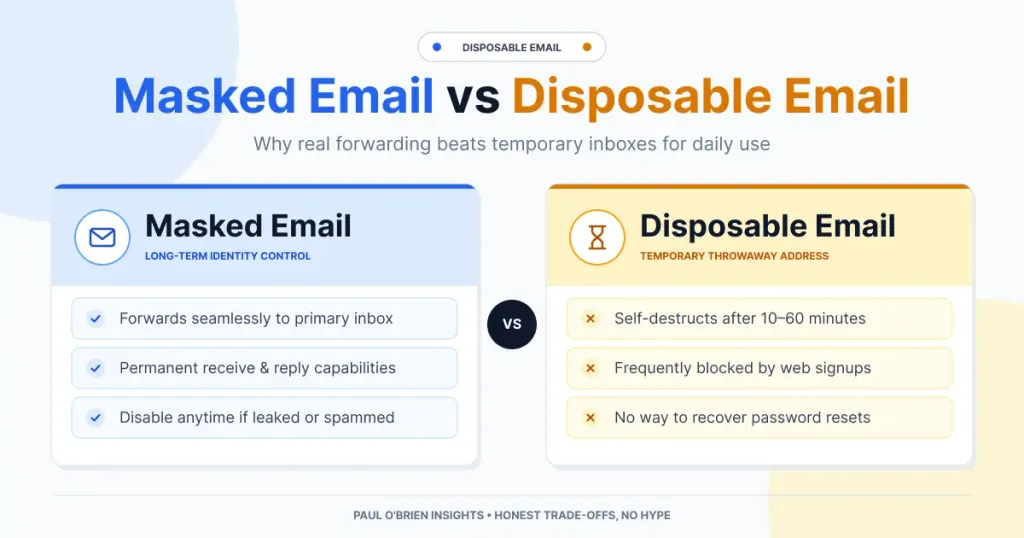
A disposable email address hides your real one for a few minutes and then disappears. A masked email address does the same job but forwards to your real inbox, so you keep password resets, can switch it off whenever you like and are less likely to be blocked. For most people, masked email is the better tool. Disposable inboxes still suit one-off sign-ups when you have no mailbox with masking.
This guide explains how the two work, why websites block disposable addresses, how the main services compare and why I think a masking feature built into your mailbox beats a separate burner app. Service limits and prices were checked against the providers’ own pages on 8 October 2026 unless I say otherwise.
Short answer: use a masked address for any account you want to keep, a disposable inbox only for something you will never need again, and an end-to-end encrypted provider as well if your threat model includes a targeted adversary. Whichever you use, check who runs the service, because they can see your mail.
Reader offer: 10% off your first year of Fastmail. Masked Email is built into every Fastmail account. Try it free for 30 days, and my referral link takes 10% off your first year.
At a Glance: Which Kind of Address Should You Use?
| User Profile | Best Fit? | Core Value Drivers / Key Trade-offs |
|---|---|---|
| Signing up to an account you want to keep | Masked address: Ideal | Password resets keep arriving, and you can switch the address off. Needs a mailbox or service that offers masking. |
| One-off download or free trial you will never revisit | Disposable: Workable | No account needed. Many free inboxes are public, expire quickly and get blocked. |
| Already on Gmail and unwilling to switch | Standalone alias service: Strong fit | SimpleLogin, addy.io, Firefox Relay or DuckDuckGo forward to your existing inbox. Adds a second company to the chain. |
| Developer or tester | Disposable: Ideal | Services such as Mailinator are built for testing forms and flows. |
| High-risk or targeted | Alternative needed | Pair masking with an end-to-end encrypted provider. Masking does not hide mail from the service that forwards it. |
Why Your Email Address Is Worth Protecting
Every online account asks for the same thing: your email address. For most people that address is also their identity. It is the key to password resets, bank alerts and years of correspondence. Handing it to every online store, forum and free trial is like giving every stranger a copy of your front-door key.
Websites lose customer data more often than most people realise, and an email address is almost always part of what leaks. You can check which breaches include yours on Have I Been Pwned. Exposed addresses end up on lists that are bought, sold and shared. The first effect is more spam and phishing, which can be convincing because the sender knows which services you use.
The second effect is more serious. Attackers take leaked email and password pairs and try them elsewhere, a technique called credential stuffing. If you reused a password, one breach at a forgotten forum can unlock your main mailbox, and from there “forgot password” links can open your banking and shopping accounts. A password manager and unique passwords are the real fix, and the NCSC has practical guidance on choosing strong passwords. A different address per site adds a second layer: even if an attacker gets your password from a forum breach, they will not know the address you use for your bank.
Disposable Email vs Masked Email: What’s the Difference?
The two terms get mixed up constantly, but they work differently.
| Disposable (burner) email | Masked email (alias) | |
|---|---|---|
| What it is | A short-lived inbox opened in a browser | A real address that forwards to your actual inbox |
| Account needed? | Usually none | Yes, with a mailbox or alias service |
| Lifespan | Set by the operator, often minutes to hours | Set by you. Keep it or switch it off |
| Password resets | Unreliable. The inbox may be public or gone | Arrive in your normal inbox |
| Likely to be blocked? | Often. Domains sit on blocklists | Less often, though some sites still reject unfamiliar addresses |
| Who can read the mail? | Possibly anyone, for public inboxes | You, plus the service that forwards it |
Fastmail describes the benefit of masking simply: companies cannot link different Masked Email addresses together to track you, and if one starts getting spam you can turn it off and know who leaked it. A disposable inbox is for something you will never need again. A masked address can serve either purpose, because you decide whether to keep it or switch it off.
Benefit 1: Clear Legal Accountability
Every email privacy tool shares the same limitation: to forward, store or display your messages, the operator has to handle them first. However clever the software, you are trusting a third party with your data. So the important question is who runs the service and where they can be held accountable.
Disposable providers vary
Some are open about what they are. Mailinator is run by a named company, Manybrain, Inc. It now presents itself as an email and SMS testing platform for developers and QA teams, while still offering free public inboxes. Guerrilla Mail has run since 2006, keeps mail for about an hour and publishes terms of service that say it can end your access and delete your data without notice.
That openness counts in their favour, but it does not change how the product works. Many free disposable inboxes have no password at all, so anyone who knows or guesses the address can open them. Public inboxes are fine for testing a sign-up form and a poor place for a password-reset link or a one-time code.
At the other end are services that publish very little. When I looked at QuickInbox.app, I could not find legal disclosures, and I saw signs of PostHog analytics and Stripe payments. These are my own observations from an informal look, not independently verified, and several unrelated sites use similar names. I am not accusing anyone of wrongdoing. The point is that, as far as I could tell, a user would have no easy way to learn what happens to their mail.
A checklist for any email privacy provider
Age alone does not make a service trustworthy. What matters is what the operator publishes and what you can hold it to.
- Is there a named company? A legal entity with an address can be held accountable.
- Is there a privacy policy and terms? Their absence is a red flag.
- Are third parties listed? Analytics, payment processors and hosting should be disclosed.
- How does it make money? If you cannot tell, you may be the product.
- Is there a track record? Years of operation, ownership history and public incidents all count.
- Is there a way to leave? Can you export your data or point a custom domain elsewhere?
- What if it shuts down? A one-person tool can disappear overnight.
Disclosure is the real difference. A payment processor appearing on a site is not the problem. Hiding it is. Fastmail publishes a list of its subprocessors, which includes payment processors such as Stripe, Paddle and PayPal, Cloudflare for content delivery and security, and DeepL for translation of support and spam content.
Benefit 2: Fewer Blocked Sign-Ups
Disposable email has become a cat-and-mouse game between users and the websites they sign up to. Website owners worry about free-trial abuse, repeated promo-code claims, fake reviews and spam, and the blunt response is to block whole categories of address.
The figures quoted come from email-validation companies, which sell the fix, so treat them as indicative. One industry write-up puts temporary email at around 12% of all registrations, and another claims up to 30% of free-tier sign-ups come from bots, scripted abuse or burner addresses. One open-source blocklist advertises more than 110,000 disposable domains, updated daily. The oldest names are the easiest to block: Mailinator, founded in 2003, has domains many sites reject. If a site refuses your “temporary” address, that is usually why.
Masked email sits in a different category. Careful blocklist makers separate disposable inboxes from forwarding aliases. One directory states that aliases such as SimpleLogin, duck.com, addy.io, mozmail.com and Apple’s relay addresses are not disposable, because they deliver to a real, permanent inbox, and another warns that blocking them turns away genuine customers. Fastmail’s Masked Email uses a mainstream domain, and I found no evidence of fastmail.com on the disposable-domain lists I checked. Some sites apply their own rules, so the honest summary is “less likely to be blocked”, not “never blocked”.
Benefit 3: More Control
With a disposable inbox, the operator decides when the address expires. With a masked address, you decide.
- Switch it off when you are finished with a site, or when it starts sending spam.
- Know who leaked it. Each address belongs to one site, so spam shows you where it came from.
- Spot fakes. Messages to a Masked Email address show a masked icon in Fastmail, and opening one reveals the label you gave it. If an email you gave to a shady site pretends to be from your bank, you will know.
- Create them where you sign up. Fastmail says you can connect 1Password or Bitwarden to create masked addresses as you register, and you can use your own domain instead of Fastmail’s shared one, which is less anonymous but keeps the addresses portable.
Where Disposable Email Still Wins
- You have no mailbox with masking. Masked Email is a Fastmail feature, so you need a Fastmail account. Someone on Gmail who wants a one-off address will not switch provider for that.
- You want no account at all. Disposable inboxes need no sign-up and no payment. A masked address is tied to an account, so it protects your address from the site rather than your identity from your provider.
- You are a developer or tester. Tools like Mailinator exist for automated email and SMS testing, with large numbers of test inboxes and an API.
Why a Built-In Feature Beats a Separate App
Most standalone alias services work by forwarding. Your mail arrives at their server, then travels on to your real inbox. That means two companies, one running the alias and another running your mailbox. Each can see your messages, and each can fail or change its terms independently.
A mailbox with masking built in removes one of those parties. The addresses are generated and managed in the same place the mail lands, so there is one privacy policy to read and one company to hold accountable. Fastmail is not the only provider that works this way. Apple’s Hide My Email, included with iCloud+, creates random addresses that forward to your inbox and lets you reply from them, and Apple says messages are deleted from its relay servers after delivery. So the case for Fastmail rests on a combination of independence, a paid-only model, a published subprocessor list and an open standard. I made the wider case in my Fastmail security and privacy deep dive.
Fastmail’s track record
- Founded in Melbourne in 1999 and sold to Opera Software in 2010.
- Bought back by its staff in 2013, which reclaimed the name.
- Acquired Pobox in 2015, one of the oldest email companies still in existence.
- Said in 2012 it would stop free sign-ups and focus on paying customers, with the remaining guest and one-time-payment accounts ending on 31 July 2017.
- Helped create JMAP, an open email protocol (RFC 8620), which Masked Email is built on.
I find that history reassuring. It shows a company that tried the free model, saw the conflict with privacy and chose to charge. Its privacy policy states that it does not use profiling for personalised content or ads.
How the Main Options Compare
| Option | Type | Cost | Replies from the alias? | Notes |
|---|---|---|---|---|
| Mailinator | Disposable | Free public inboxes; paid plans for testing | No | Anyone can read public inboxes. Aimed at developers and QA |
| Guerrilla Mail | Disposable | Free | No | Around since 2006, mail kept for about an hour |
| SimpleLogin | Alias (forwarding) | Free: 10 aliases. Premium $36 a year or $4 monthly | Yes | Open source, a Proton product. Premium adds custom domains, catch-all and PGP |
| addy.io | Alias (forwarding) | Free: 10 shared-domain aliases and 10 MB bandwidth a month. Paid from $1 a month yearly (per a third-party directory) | Not verified | Open source. Limits are from a third-party directory, so confirm on addy.io |
| Firefox Relay | Alias (forwarding) | Free: 5 email masks. Premium listed as a waitlist when I checked | Premium only | Premium removes the mask limit and adds anonymous replies |
| DuckDuckGo Email Protection | Alias (forwarding) | Free | Yes | Strips trackers. See my DuckDuckGo guide |
| Apple Hide My Email | Alias (built into iCloud+) | Included with iCloud+ | Yes | Messages deleted from Apple’s relay servers after delivery, per Apple |
| Fastmail Masked Email | Alias (built into mailbox) | Paid mailbox: $5 a month on yearly billing, 30-day trial | Not stated on Fastmail’s page | One provider for mailbox and alias. 1Password and Bitwarden integrations |
The alias services are respectable options, and several are open source. The trade-off is that you are adding a second company to the chain.
Honest Criticisms of Fastmail
A fair article has to include the downsides.
- It is not end-to-end encrypted. Fastmail says on its security page that it does not offer end-to-end encryption in its own apps, because it does not believe it provides a meaningful increase in security for most users. It argues that webmail delivers the decryption code from the server anyway, and that the cost is search, previews, spam checking and recovering your history if you lose a key. It points people who need E2EE to PGP or S/MIME in third-party apps, or to Signal. Critics reply that this still leaves the provider able to read your mail, which is the point of the criticism.
- Jurisdiction. Fastmail is based in Australia, a Five Eyes country. Data historically sat in the US, though Fastmail launched an EU data region in August 2026, with caveats I cover in Proton Mail vs Fastmail.
- It costs money. There is no permanent free tier, only a free trial of up to 30 days.
- Switching has a cost. To use Masked Email you move your mailbox to Fastmail. If you want to stay with Gmail, a standalone alias service is the honest answer.
The fair reading is that Fastmail offers practical privacy rather than maximum secrecy. If your concern is stopping advertisers, blocking data brokers and cutting spam, it is an exceptionally strong fit. If your threat model involves state-level surveillance or a targeted adversary, pair it with an end-to-end encrypted provider, and see who zero-access email is actually for.
Frequently Asked Questions
Is disposable email legal?
Yes, in most places. Using one to commit fraud or abuse a service is not.
Can I use a masked address instead of a disposable one?
Yes. Create a masked address for the site, then switch it off when you are finished. If you keep the account, leave it pointing at your real inbox.
Why do websites block disposable email?
Mainly to stop fake sign-ups, free-trial abuse and spam. The figures usually quoted come from companies that sell blocking tools, so treat them as indicative.
Are masked email addresses the same as disposable ones?
No. A masked address forwards to a permanent inbox and you can switch it off. A disposable one usually expires and may be public.
Will a masked address get blocked?
It is less likely than a classic temp-mail domain, but some sites may still reject unfamiliar addresses.
Is masked email free?
Not on Fastmail, which is a paid service with a free trial. Several standalone options have free tiers: SimpleLogin gives you 10 aliases, Firefox Relay gives you 5 masks, and DuckDuckGo Email Protection is free. Apple’s Hide My Email comes with iCloud+.
Can I use masked email with my existing Gmail?
Fastmail’s Masked Email needs a Fastmail mailbox. If you want to stay with Gmail, a standalone service such as SimpleLogin, addy.io, Firefox Relay or DuckDuckGo Email Protection can forward to it.
Is a paid provider really more private than a free one?
Not automatically. But a subscription gives the provider a reason to protect you rather than monetise you, and gives you a company to complain to. For more on that trade-off, see free vs paid email: what you really pay with.
The Verdict: Choose Accountability
A masked address gives you what a disposable one promises: a barrier between your real address and the site. It also gives you a way to keep the account, fewer blocked sign-ups and the ability to switch the address off.
- One-off sign-up, no mailbox with masking: a disposable inbox is fine, as long as you accept it may be public and may be blocked.
- Any account you want to keep: a masked address.
- High-risk threat model: an end-to-end encrypted provider, alongside or instead.
Once you accept that someone has to run the service, the question becomes who. A named company with decades of history, a published subprocessor list, an open standard it helped write and a business model that depends on you paying is a safer bet than an anonymous tool with no terms. Fastmail is not perfect, as the criticisms above show. But its flaws are visible and documented, and that visibility is a trust signal a one-page burner site cannot offer.
Reader offer: 10% off your first year of Fastmail. If you are ready to take back control of your inbox, try Fastmail free for 30 days. If you decide to stay, my referral link gives you 10% off for your first year.
Disclosure: the Fastmail links are referral links. If you sign up through them, I may earn a commission at no extra cost to you. In this article I have tried to include Fastmail’s weaknesses as well as its strengths. Sources: Fastmail: Masked Email; Fastmail: security; SimpleLogin pricing; Firefox Relay; Apple: Hide My Email; Toolradar: addy.io pricing (third-party). Last checked 8 October 2026.

