
iCloud Mail Needs a Redesign: A Webmail Concept
Apple’s hardware is world-class, but iCloud Mail on the web feels abandoned. Here is what iCloud Mail offers today, why it needs a rebuild, and a concept UI I mocked up.

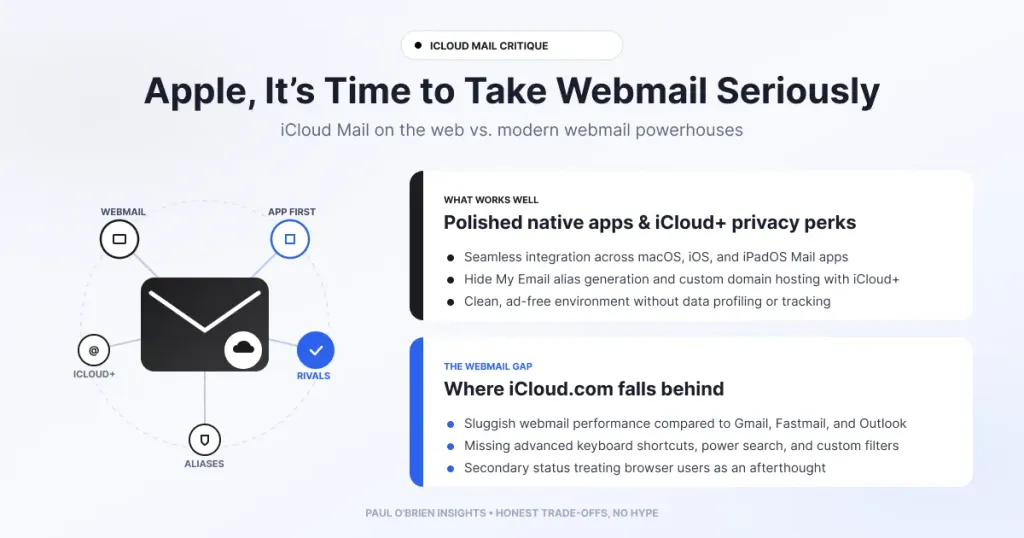
Apple builds some of the best hardware in the world, yet iCloud Mail on the web feels like an abandoned side project. Here is why Apple should rebuild webmail from the ground up, what iCloud Mail offers today, and a concept UI I mocked up to show what a modern version could look like.
Google dominates search and Gmail. Microsoft has Bing and Outlook. Even Yahoo still maintains a massive email presence. Yet Apple, one of the most valuable companies on the planet, has largely opted out of the webmail race.
Short answer: iCloud Mail works as a basic address attached to your Apple ID, and backup and sync are excellent. As a daily webmail for people who live in their inbox, it falls short of Gmail, Outlook and Fastmail. A ground-up redesign would fix that.
At a Glance: Who iCloud Mail Is (and Isn’t) For
| User Profile | Best Fit? | Core Value Drivers / Key Trade-offs |
|---|---|---|
| Apple-only household using email for receipts and password resets | Strong fit | Built in, nothing to set up. Hide My Email and sync work well. |
| Student or casual user | Workable | Fine for basics. Storage is shared with backups and photos. |
| Business user or power user who lives in webmail | Alternative needed | The web interface is basic, and I have had delivery problems. |
| Someone wanting a custom domain | Partial fit | iCloud+ includes custom email domains, but see my delivery experience below. |
Why I Can’t Stand iCloud Webmail
As a longtime Apple user, I’m a huge fan of their hardware ecosystem. In our house, Apple has been a mainstay since the original iPhone. I use an iPhone and an iPad, I write on a MacBook Air, and we have an Apple TV alongside an Apple Watch (which my wife gracefully inherited from me).
What I’ve never been able to stand, however, is their email service.
iCloud webmail is just… dull. It feels basic, clunky and outdated, to the point where even Yahoo Mail leaves Apple’s web effort in the dust. I have an @icloud.com address, but it exists solely to forward messages to my main domain. I refuse to rely on the web interface, and frankly, I don’t 100% trust their email delivery.
The disappearing email problem
Both my wife and I have experienced messages vanishing into the void. In the past, we’ve sent emails from one iCloud address to another, only for them to neither arrive nor bounce. I even tried upgrading to iCloud+ to run a custom domain, but I ran into the same missing-email issues and erratic mailbox behaviour. That is my own experience rather than a measured failure rate, but it is why I forward everything elsewhere. If you want to understand what should happen when authentication or delivery fails, my guide to DMARC and failed email authentication covers it.
What iCloud Mail Offers Today
The limits and features below come from Apple’s support pages, checked on 9 October 2026.
| Area | What Apple says |
|---|---|
| Free storage | 5 GB, shared with backups, Photos and iCloud Drive. If you run out of iCloud storage you can’t send or receive email with your iCloud address. |
| Message size | 20 MB in and out, rising to 5 GB with Mail Drop. |
| Sending limits | 1,000 messages and 1,000 recipients a day, with a maximum of 500 recipients per message. Meant for personal use, and bulk email is prohibited. |
| iCloud+ plans | 50 GB at £0.99 a month, 200 GB at £2.99, 2 TB at £8.99 in the UK. Every plan includes Hide My Email and a custom email domain. |
Hide My Email is genuinely useful. If you want to see how it compares with other alias services, read my guide to masked email vs disposable email. The hardware and sync side is not the problem. The inbox is.
What Apple Should Do About It
It’s frustrating. With every major macOS and iOS release, I skim the feature list hoping for a breakthrough in email. Apart from minor polish added to the desktop Mail app, nothing truly exciting ever happens.
Apple should absolutely keep their system backup and sync features, because those work brilliantly. But Mail, Calendar, Contacts, Drive and the web interface desperately need a complete ground-up overhaul: new design, modern features, the lot.
Apple seems to forget that not everyone uses iCloud email just for store receipts and password resets. A huge portion of their customer base consists of business users, students and power users. For someone like me who lives inside a webmail interface, I need a UI that actually inspires productivity, not something that feels like an abandoned side project.
It feels as though the iCloud web team consists of two engineers a few weeks away from retirement, relegated to sub-level 3 in some dingy corner of Apple Park, forgotten until someone upstairs remembers to CC them on a launch prep email once a year.
The bar: forget just slapping basic AI features onto Mail and calling it a day. Apple needs to design macOS Mail and iCloud webmail so that logging in gives you the same feeling as opening a brand-new MacBook Air: I love this product, and I’m never leaving this ecosystem.
A Concept for a Modern iCloud Mail
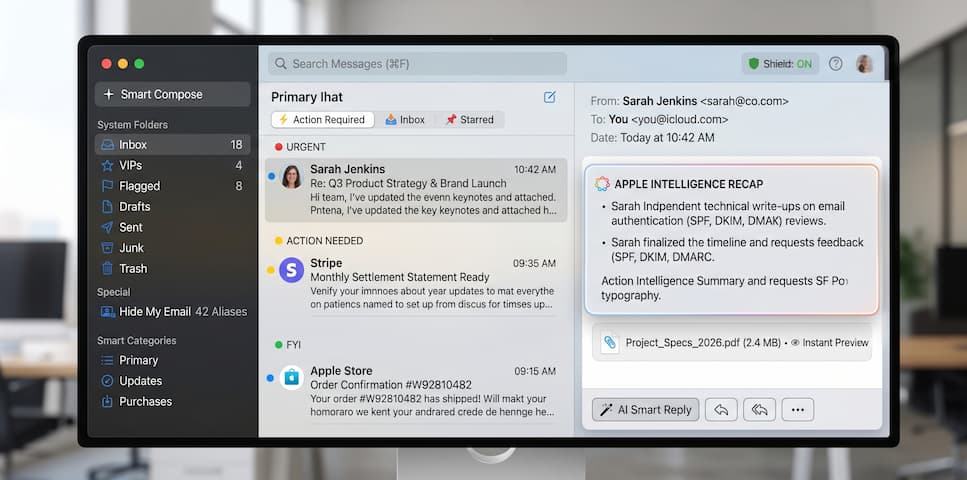
With Apple’s resources and design talent, they could easily keep users entirely within iCloud, preventing them from wandering over to Google Workspace or Microsoft 365. To prove what’s possible, I recently mocked up an idea for what a truly modern, power-user-focused iCloud Mail UI could look like, and the result makes Apple’s current webmail look decades behind.
Pros and Cons of iCloud Mail Today
| Strengths | Weaknesses |
|---|---|
| Built into every Apple device | Basic, dated web interface |
| Hide My Email and custom domain on iCloud+ | Delivery problems in my own experience, including messages that neither arrived nor bounced |
| Backup and sync work brilliantly | Storage shared with everything else on the account |
| Cheap upgrade from 5 GB to 50 GB | Personal-use limits and no bulk sending |
Frequently Asked Questions
Is iCloud Mail good enough for business?
Not in my view. Apple’s sending limits are for personal use, and the web interface is basic. If you need a business mailbox, see my reviews of Fastmail and Google Workspace.
How much storage does iCloud Mail get?
iCloud includes 5 GB for free, shared with backups and Photos. Paid iCloud+ plans start at 50 GB, listed at £0.99 a month in the UK.
Can I use my own domain with iCloud Mail?
Yes. Apple lists a custom email domain as part of every iCloud+ plan. I tried it and ran into missing email, so test delivery carefully before you rely on it. My post on why using your own email domain makes sense explains the benefits of owning your address.
What are the iCloud Mail sending limits?
Apple lists 1,000 messages and 1,000 recipients a day, 500 recipients per message, and a 20 MB message size limit (5 GB with Mail Drop).
Is it worth forwarding iCloud Mail to another address?
That is what I do. It keeps your Apple ID address working without depending on the web interface.
The Bottom Line
Apple does hardware, sync and design better than almost anyone. Mail, Calendar, Contacts, Drive and the web interface need the same attention. Until then I will keep treating my iCloud address as a forwarding address and doing my real email somewhere better. For a comparison of what that could be, see my email provider deals page.
Note: this article contains no affiliate links. Sources: Apple: mailbox size and message sending limits in iCloud; Apple: iCloud+ plans and pricing. Checked 9 October 2026.

